

It’s 9:30 on a Tuesday night. You’re sitting at the kitchen table with your laptop open, a cold cup of coffee beside you, trying to reconcile your Excel schedule with a chain of WhatsApp messages from three different technicians. One customer says their appointment was for 8 a.m. Two techs showed up. Nobody can figure out who confirmed what, because the message got buried under 47 other notifications in the group chat.
Meanwhile, you still have four invoices from last week that haven’t gone out yet.
If this sounds familiar, you’re not alone. Thousands of Canadian service business owners, plumbers, HVAC contractors, home cleaners, landscapers, and auto detailers are running their companies exactly this way. And for a while, it works. Until it doesn’t.
The tools that got you to five technicians and 20 jobs a week are not the tools that will get you to ten technicians and 50 jobs a week. At some point, and there’s a very specific tipping point, spreadsheets and WhatsApp stop being helpful and start costing you real money, real customers, and hours you’ll never get back. According to ADP Canada research, small businesses spend an average of 21 hours per week managing administrative tasks and disconnected systems instead of focusing on growth and operations.
This guide breaks down what service business management software actually is, exactly when spreadsheets and WhatsApp break down, why it happens, and what growing service businesses across Canada are doing instead to scale without the chaos.
What Is Service Business Management Software?
Before diving into the problems, it helps to understand what the solution actually is, because “management software” means different things in different industries.
Service business management software is an all-in-one digital platform built specifically for businesses that send people out to do jobs. Think HVAC companies, plumbing contractors, home cleaning services, landscapers, auto detailers, electricians, and any other trade or home service business that runs on bookings, dispatching, and invoicing.
Unlike generic business tools, service management software is designed around how field service actually works: a job comes in, you schedule a technician, they travel to a location, complete the work, and you invoice the client. Every feature in a good platform is built to handle that cycle faster, more accurately, and with less admin work.
At its core, the right service business management software brings together:
- Scheduling and dispatching: so every job, every technician, and every time slot lives in one live system
- Invoicing and payments: so every completed job automatically turns into an accurate invoice with correct HST/GST
- Customer communication: automated confirmations, reminders, and follow-ups replacing manual WhatsApp messages
- GPS and real-time tracking: so you always know where your team is, and clients always get accurate arrival windows
- Reporting and business insights: so you can see which services are profitable, which techs perform best, and where revenue is headed
Think of it this way: right now, you’re running your business across five or six separate tools, a spreadsheet, WhatsApp, maybe QuickBooks, your phone, and your memory. Service business management software collapses all of that into one connected platform, where one action in the field updates everything else automatically.This is not enterprise software built for large corporations. It is specifically designed for service businesses with 2 to 50 technicians that are past the “just me” stage but not yet running a full operations team. And in 2026, the Canadian service businesses that are growing fastest are the ones that made this switch early.
How Most Service Businesses Actually Start (And Why It Works at First)
Let’s be clear about one thing: there’s nothing wrong with starting on spreadsheets and WhatsApp. They’re free, familiar, and flexible. When you’re a one- or two-person operation handling ten jobs a week, they genuinely work.
You build an Excel sheet for scheduling, another for invoicing, and you manage customer questions over WhatsApp. You know every client’s name, you remember every job, your tech texts you when he’s done, you update the sheet, and life moves on.
This is normal. This is how almost every service business in Canada starts, before eventually moving toward a more structured field service management software system as operations grow.
The problem isn’t that you chose the wrong tools early on. The problem is that most owners don’t notice when those tools stop working. The shift happens gradually, one missed booking here, one lost invoice there, until one day you realise that the chaos isn’t just annoying anymore. It’s actively blocking your growth and costing you customers who’ve quietly moved on to a competitor that responds faster, books easier, and invoices cleaner.
5 Clear Signs Your Spreadsheets Are Slowing You Down
This is the honest checklist most software companies won’t give you. Go through it carefully, because every “yes” is costing you money right now.

1. You’ve Had at Least One Double-Booking in the Past 90 Days
Double-bookings are the clearest signal that your scheduling system has outgrown your spreadsheet. When two people can edit the same file, or when you have separate files for separate techs, version conflicts are inevitable. One person updates the schedule on their laptop. Another updates a different version on their phone. Neither knows the other changed it.
The threshold: If you have 3 or more technicians sharing a scheduling spreadsheet, double-bookings are not a question of “if”, they’re a question of “how often.”
Purpose-built scheduling software solves this at the source by keeping all appointments in a single live system that every team member sees in real time, with automatic conflict detection before a booking is confirmed.
2. You’re Spending More Than 6 Hours a Week on Admin Alone
Here’s a calculation worth doing right now. If you’re managing 20 jobs a week manually, building the schedule, dispatching techs, tracking job status, following up on quotes, chasing invoices, you’re conservatively spending 8 to 10 hours a week on pure administration.
At even $30 per hour, that’s $240 to $300 every single week. Over a year, that’s more than $14,000 of your personal time spent on tasks that software handles automatically.
That number gets significantly worse at 30 or 40 jobs per week. And it compounds faster than most owners expect, because every new technician you hire adds more coordination overhead, not less.
3. You Can’t Tell Right Now Which Invoices Haven’t Been Paid
Go ahead and try. Without opening your email, your spreadsheet, and your bank account at the same time, can you tell which clients owe you money today?
Most spreadsheet-based businesses can’t. The invoicing sheet is separate from the scheduling sheet. Payments are tracked manually. Errors sneak in when cells are copied incorrectly, when jobs are added but invoices aren’t updated, or when the person doing the billing is different from the person who did the scheduling.
The moment this breaks down, you’re effectively giving away free services. Invoicing software connected directly to your jobs means every completed job automatically creates a professional invoice, with the right line items, the correct HST or GST calculation for your province, and a digital payment link your client can use immediately from their phone.
4. Your Techs Are Calling the Office for Information That Should Already Be in the System
“Hey, what’s the customer’s gate code?” “Did they want the premium filter or standard?” “Where exactly is this address?”
Every one of those calls represents a gap in your system. When your techs can’t find job notes, customer history, or special instructions without calling in, your information is scattered, some in the spreadsheet, some in WhatsApp, some in your head. This wastes time on both ends and makes your business look unprofessional to clients who expect technicians to arrive prepared.
5. You Don’t Know in Real Time Where Your Techs Are or What They’re Working On
If a customer calls asking when their technician will arrive, what do you say? If you have to text the tech and wait for a reply, that’s a visibility gap, and your client notices it.
Without live GPS tracking, you’re managing your field team on memory and trust. That works for two people. At five or more, it’s impossible to maintain without a real system behind it.
Quick Self-Assessment: Has Your Business Outgrown Spreadsheets?
Take a quick look through these questions. If you find yourself saying “yes” more than a few times, your current system may already be slowing your growth.
| Self-Assessment Questions | ✓ |
| Had a double-booking in the last 3 months? | ☐ |
| Spending 6+ hours weekly on scheduling, invoicing, or admin work? | ☐ |
| Need to cross-check multiple files or chats to track unpaid invoices? | ☐ |
| Techs regularly call the office for customer details or job updates? | ☐ |
| No real-time visibility into where your team is or what they’re working on? | ☐ |
| Customers complained about delayed responses, missed updates, or scheduling confusion. | ☐ |
What Your Score Means
- Checked 3 or more?
Your business has likely outgrown spreadsheets and WhatsApp workflows. The longer you wait, the more operational inefficiencies, missed revenue, and customer frustration compound over time.
- Checked 1–2?
You’re approaching the tipping point. This is usually the best time to implement a proper field service management system before the chaos starts affecting growth, team morale, and customer retention.
Why WhatsApp Breaks Down as a Business Communication Tool
WhatsApp is a personal messaging app. It was built for chatting with friends and family, not for coordinating a field service team, managing client expectations, tracking job updates, or maintaining a professional audit trail.
That distinction matters more than most service business owners realise.
There’s No Audit Trail, and That’s a Real Business Risk
When something goes wrong, a job dispute, a missed appointment, a billing disagreement, your first instinct is to go back to the record. What was agreed? When was it confirmed? Who was notified?
In WhatsApp, that record doesn’t exist in any meaningful way. Messages scroll. Group chats get noisy. Important confirmations get buried under unrelated messages. There’s no way to search by client, by job, or by date the way a real CRM allows.
In Canada, this carries a PIPEDA consideration too. Customer information shared over personal WhatsApp groups, home addresses, access codes, and payment discussions isn’t stored or protected in a way that meets professional data handling expectations. As your business grows and handles more clients, this becomes a liability, not just an inconvenience.
Messages Get Lost, and Lost Messages Lose You Clients
Your client messages at 2 p.m. to reschedule. Your tech sends a job update at 2:01 p.m. A supplier confirms a parts delivery at 2:02 p.m. The client’s reschedule request is now buried, and nobody follows up.
The client calls to complain. The tech shows up at the wrong time. The job falls apart. A bad review follows.
This isn’t hypothetical. It’s happening in WhatsApp-run service businesses across Canada every day. The automated client reminders and follow-up tools built into proper service management software mean no message gets missed; every confirmation, reminder, and follow-up happens automatically, without you having to remember to send it.
Clients Can’t Self-Book or Check Their Own Job Status
Modern clients, especially in urban Canadian markets like Toronto, Vancouver, Calgary, and Ottawa, are used to booking services online. They expect to be able to request an appointment, receive a confirmation, and check their job status without having to send a WhatsApp message and wait for a reply.
If your only intake channel is a WhatsApp number, you’re losing bookings to competitors who offer online booking. You’re also tying up your own time handling booking requests manually when a customer portal would handle it for you, 24 hours a day.
WhatsApp Has No Integration with Anything Else in Your Business
Your scheduling is in Excel. Your invoicing is in another spreadsheet or QuickBooks. Your client communication is on WhatsApp. Your payment records are in your bank app.
None of these talks to the others. Every time something happens, a job is completed, a client reschedules, a payment comes in, someone has to manually update three or four places. That’s where errors happen. That’s where things fall through the cracks. And that’s where businesses quietly lose money without ever identifying the source.
Common Mistakes Service Businesses Make When They Try to Scale
Understanding what breaks is only half the picture. Understanding why business owners stay stuck, and what the wrong “fixes” look like, saves you time and money when you’re ready to make a change.
Mistake 1: Hiring More People Instead of Fixing the System
The most common response to operational chaos is to hire an extra admin person or office manager to “manage the spreadsheet better.” This feels like a solution, but it’s actually just scaling the problem. You now have two people manually maintaining a system that was never designed for what you’re asking it to do.
Real scaling happens when you build a system that delivers the service, and then hire people to run that system. A new hire in a well-structured software environment becomes productive within days. A new hire dropped into a WhatsApp-spreadsheet operation takes weeks to learn the chaos, and often makes it worse before they make it better.
Mistake 2: Patching with More Tools Instead of One Connected Platform
As the problems multiply, many owners add more separate tools, a standalone booking tool here, an invoicing app there, a different messaging platform for the team. The result is a patchwork of five or six disconnected systems, each of which requires manual data entry to keep in sync.
The businesses that scale successfully past 10 technicians aren’t doing it with more tools. They’re doing it with fewer, better-connected tools, ideally a single platform where scheduling, dispatching, invoicing, and communication all live together and update each other automatically.
Mistake 3: Waiting Until the Pain Is Unbearable
Most owners switch software after something goes badly wrong, a major client complaint, a month where cash flow is unreadable, or a double-booking that costs a contract. By that point, the transition happens reactively and under pressure.
The service businesses that come out ahead are the ones that switch proactively, when things are still manageable, so the new system is in place before the next growth phase begins. Growth on a solid operational foundation is smooth. Growth on a broken foundation is expensive.

What Growing Service Businesses in Canada Switch To (And Why)
The answer isn’t a dozen different tools stitched together. It’s a single, purpose-built service business management platform, one that replaces the spreadsheet-WhatsApp-invoicing patchwork with a connected system where everything talks to everything else.
Here’s what that looks like in practice:
- Scheduling and dispatching work from one live calendar. You see all your techs, all your jobs, and all your availability in one place. When you book a new job, the system checks for conflicts automatically. When a job changes, your tech gets notified on their phone instantly.
- Invoicing connects directly to jobs. When a tech marks a job complete, the invoice generates automatically with the correct line items, your HST or GST breakdown for Canadian tax compliance, and a payment link the client can use immediately. Unpaid invoices are tracked in a live dashboard, with payment reminders going out automatically.
- GPS tracking and smart dispatching let you see where every tech is in real time, assign the closest available technician to an urgent call, and give clients accurate arrival windows, without anyone having to call or text.
- Automated client communication handles appointment confirmations, reminders, follow-ups, and review requests automatically, replacing the manual WhatsApp messages you’re sending right now.
- Reporting and analytics give you a real, live picture of your business: which jobs are most profitable, which techs perform best, which clients are overdue for service, and where your revenue is trending week by week.
Here’s a direct comparison of what this looks like in practice:
| Task | WhatsApp + Spreadsheets | All-in-One Service Software |
| Booking a new job | Manual entry in spreadsheet, message tech on WhatsApp | Auto-added to live calendar, tech notified instantly |
| Client appointment reminder | You or your admin sends it manually | Sent automatically 24 hours before |
| Invoicing after job completion | Manual invoice created separately | Auto-generated from job details |
| HST/GST calculation | Manual, error-prone | Calculated automatically per Canadian tax rules |
| Tracking unpaid invoices | Cross-reference spreadsheet + email | Live dashboard with automatic follow-ups |
| Client wants to reschedule | WhatsApp message, manual update | Self-serve online booking portal |
| Tech needs job instructions | Calls the office | All info in their mobile app |
| Knowing where your team is | Text each tech individually | Live GPS map, updated in real time |
Key Features to Look For in Service Business Management Software
Not all platforms are built equally, and the wrong choice wastes time and money. When you’re evaluating options, here’s what actually matters for a Canadian home service or field service business:
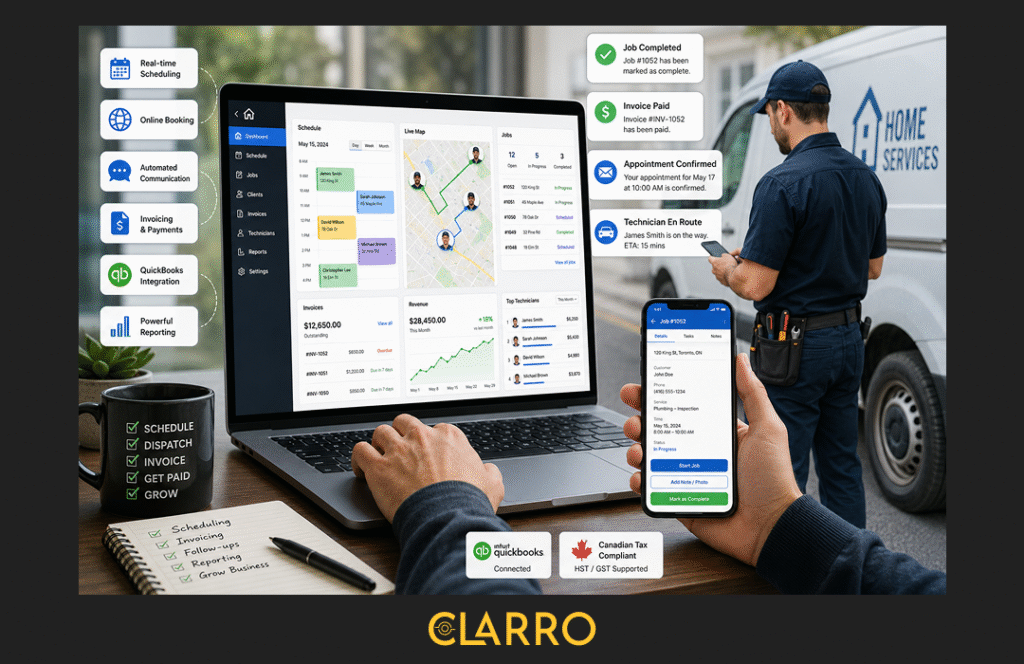
Scheduling with real-time conflict detection: the system should prevent double-bookings automatically, not just flag them after the fact.
Mobile-first technician app: your techs work in the field. They need a clean, simple mobile app where they can see their schedule, access job notes, collect payments, and mark jobs complete, without calling the office.
Integrated invoicing with Canadian tax support: invoicing should connect directly to jobs and handle HST/GST correctly for your province without manual calculation.
Automated client communication: appointment confirmations, reminders, and follow-ups should happen automatically. This is one of the highest-value features for reducing no-shows and improving client retention.
GPS tracking and dispatching: live visibility into where your team is enables smarter dispatching, more accurate arrival estimates for clients, and better accountability without micromanagement.
Online booking for clients: a customer-facing booking portal means you capture new business around the clock, not just when someone is available to answer a WhatsApp message.
QuickBooks integration: most Canadian service businesses already use QuickBooks for accounting. Your service software should connect to it directly, so you’re not doing double data entry.
Reporting you can actually use: you need to see revenue by technician, job profitability, unpaid invoices, and client retention data, not just total bookings. Good reporting is what separates businesses that grow intentionally from those that grow accidentally.
How Clarro Helps Canadian Service Businesses Build the Right Foundation
Most field service platforms were built in the United States and retrofitted for Canadian use. Clarro is different; it was built from the ground up for Canadian service businesses, which means it handles the things that actually matter in Canada without workarounds.
Clarro is an all-in-one service business management platform that serves more than 50 industries across Canada, including HVAC, plumbing, home cleaning, landscaping, auto detailing, salons, fitness studios, and dozens more. Here’s what that looks like in practice for a growing Canadian service business:
Scheduling that actually works for field teams. The Clarro scheduling system gives you a live view of every technician, every job, and every open slot on a single calendar. You can drag, drop, and adjust in real time. Your techs see their updated schedule on their phones immediately. Conflicts are flagged before they become double-bookings.
Dispatching with live GPS. Clarro’s GPS tracking lets you see where your team is in real time, dispatch the closest available tech to an urgent call, and give clients accurate arrival windows — without a single phone call. This is the feature that most owners say saves them the most daily stress.
Invoicing that handles Canadian tax automatically. Every completed job in Clarro generates an invoice with the correct HST or GST for your province, your business details, your service line items, and a mobile payment link. Unpaid invoices show up in a clear dashboard. Automated reminders go out to clients without you having to follow up manually.
Automated marketing and client communication. Clarro’s automated marketing tools replace the WhatsApp messages, manual follow-ups, and forgotten review requests that eat hours every week. Appointment confirmations, reminder messages, post-job follow-ups, seasonal re-engagement campaigns — all set up once and running automatically in the background while you focus on the work.
A customer portal your clients actually use. Clarro gives your clients a self-serve portal where they can book appointments, view job history, check invoices, and make payments — without having to send you a WhatsApp message and wait. This is the feature that most separates the service businesses that are growing from those that are stuck.
Tech performance tracking and reporting. Clarro’s built-in reporting gives you visibility into what’s actually driving your business, revenue by job type, performance by technician, client retention rates, outstanding balances, and scheduling efficiency. This is the data you need to make real decisions about hiring, pricing, and growth, not just gut feel.
What makes Clarro specifically right for Canadian service businesses isn’t just the features; it’s that those features are calibrated for how Canadian service businesses actually operate. HST/GST is handled correctly. The platform works across provinces. And the support team understands the context of a Canadian operator, not an American one.
Building on a strong digital foundation from the start is one of the most important decisions a growing service business can make. The difference between a business that scales smoothly from 5 to 20 technicians and one that collapses under its own weight often comes down to whether the right operational software infrastructure was in place before the growth hit.
How to Make the Switch Without Disrupting Your Operations
The most common reason service business owners stay on spreadsheets and WhatsApp longer than they should is fear of disruption. Switching software sounds complicated and risky when you have jobs running every day.
Here’s the reality: switching is far less disruptive than you think, and staying on broken tools is far more disruptive than most owners realise. Most service businesses with 2 to 10 technicians are fully operational on a new platform within one to two weeks.
Step 1: Run Both Systems in Parallel for Two Weeks
Don’t switch everything overnight. For the first two weeks, use your new software for new bookings while finishing existing jobs through your old system. This gives your team time to get comfortable without any live jobs being at risk.
Step 2: Import Your Client List and Recurring Jobs First
Before going fully live, import your existing client list and any recurring appointments. This is usually a straightforward import from a spreadsheet. Once your client data is in the system, the software becomes immediately useful instead of something you’re building from scratch while simultaneously running a business.
Step 3: Walk Your Techs Through the Mobile App Before Day One
The biggest change for your field team is moving from WhatsApp to a job management app. Show them how to view their schedule, access job details, mark jobs complete, and collect payment on-site before the first live job, not during it.
Most technicians adapt within two to three days. The initial friction is short-lived. And once they experience not having to call the office for job information, most won’t want to go back.

The Bottom Line
Running your service business on WhatsApp and Excel is not a character flaw; it’s where everyone starts, and for a while, it genuinely works.
But if you’ve got more than three technicians on the road, you’re handling 20-plus jobs a week, and you’re doing admin work at 9 p.m. just to stay on top of things, you’ve already crossed the line where those tools are helping you and entered the territory where they’re holding you back.
The Canadian service businesses growing fastest right now aren’t doing it with a harder hustle. They’re doing it with better systems, systems where scheduling, dispatching, invoicing, and client communication happen in one connected platform, without six hours of nightly admin work to hold it together.
The good news is that switching isn’t as hard as it seems. And the businesses that do it consistently say the same thing: they wish they’d done it sooner.
If you’re still running your service business on WhatsApp and a spreadsheet, you’re not behind, but you will be soon if nothing changes.
Related reading:
- How to Scale a Service Business Without Losing Control
- HVAC Field Service Management Software: The Complete Guide for Canadian Contractors
- How to Choose the Right Business Management Software for Service Companies
- Field Service Management Software Canada: What to Look For
Frequently Asked Questions:
1. When should a service business stop using spreadsheets?
The clearest signal is when you have three or more technicians sharing a single schedule, or when you’re handling more than 20 jobs per week. At that volume, the manual overhead of maintaining spreadsheets and the error rate that comes with it start to cost you jobs, clients, and money visibly. If you’ve had even one double-booking or one missed invoice in the past month, you’ve already crossed the threshold.
2. What’s the best scheduling and invoicing software for Canadian service businesses?
The best platform is one built specifically for Canadian operations, meaning it handles HST/GST invoicing correctly, supports online booking, connects scheduling to invoicing automatically, and works well for field teams on mobile. Clarro is purpose-built for this use case, serving 50+ industries across Canada with scheduling, dispatching, GPS tracking, invoicing, automated marketing, and reporting in a single platform.
4. Does field service software work for HVAC businesses in Canada?
Yes, and it’s one of the highest-value use cases. HVAC businesses deal with seasonal demand spikes, recurring maintenance contracts, parts tracking, and complex multi-tech dispatching. A purpose-built HVAC business management platform handles all of this in one place, replacing the spreadsheet-WhatsApp-QuickBooks patchwork that most HVAC contractors rely on in their early years.
5. Is WhatsApp good enough for managing a field service team?
WhatsApp works well for informal updates between two or three people, but it has no audit trail, no integration with scheduling or invoicing, no client self-booking capability, and no way to structure team communication at scale. As your team grows past three people, the message volume becomes unmanageable and critical information gets lost regularly. Most Canadian service businesses that grow past five technicians move away from WhatsApp as their primary business communication tool.